Stop the "Did They Join?" Confusion. Confirm Every Hire on Day 1.
The offer is accepted. Now track candidates from acceptance to Day 1. Confirm who actually joins, mark no-shows, and download all documents in one click. No spreadsheets. No guessing. Just clear visibility from offer to onboarding.
No credit card needed • Response within 24 hours
We've Been There
Candidates accept offers… and then disappear on joining day. Or they join, but documents are scattered across email, WhatsApp, and random folders. Payroll is delayed. Roles stay "kind of filled, kind of not".
Confirm Joins in 10 Seconds. Access Documents Anytime.
One-Click Day 1 Confirmation
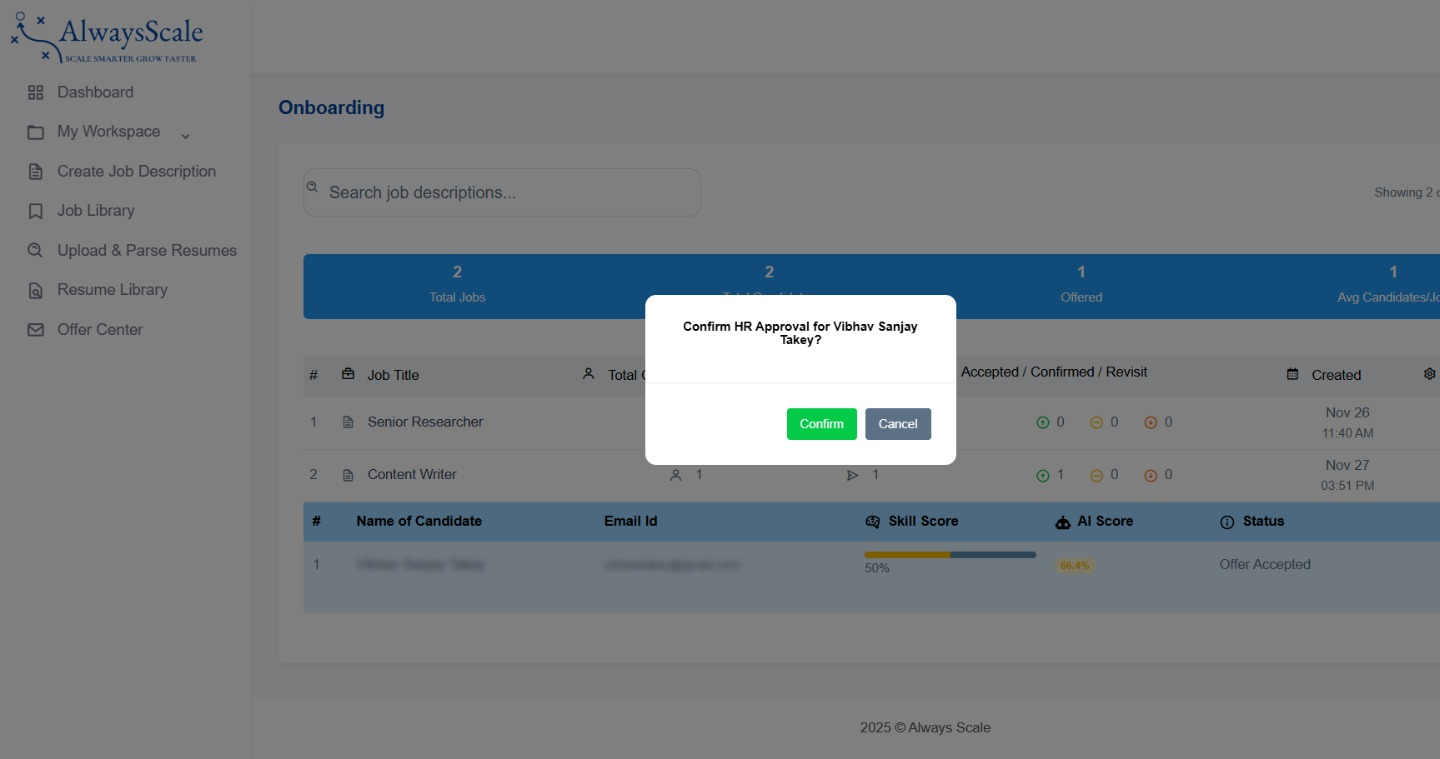
Mark each candidate as Joined or No-Show in a single click.
All Documents in One Place
Resume, ID proofs, certificates, signed offer—everything in one folder, downloadable in one click.
Clear Join vs No-Show Stats
See exactly how many offers turned into successful joins, and how many ghosted.
Instant Reopen Workflow
Mark someone as no-show → system prompts to reopen the role or contact the next candidate.
How It Works
Candidate has accepted their offer through the Offer Letter flow and (optionally) uploaded documents.
On the joining date, HR opens the dashboard and marks each candidate: 🟩 Joined or ❌ No-Show
For joined candidates, click "Download All Documents" to get a bundled folder (resume, ID proofs, certificates, signed offer, etc.).
If someone is marked No-Show, system asks: “Reopen role or contact next candidate?” → HR can reopen the job or re-engage runner-up candidates immediately.
What Makes It Different
Joining Status vs Manual Tracking
| Feature | Manual | Alwayscale |
|---|---|---|
| Knowing who joins when | Excel sheets, memory, reception | Upcoming joins dashboard with reminders |
| Day 1 confirmation | Ask around, check desk, call candidate | One-click “Joined / No-Show” |
| Document access | Search emails, WhatsApp, folders for 30 minutes | “Download All Documents” in 5 seconds |
| No-show handling | Panic + 3 days delay | Instant “Reopen role / contact next candidate” prompt |
Frequently Asked Questions
1.What's the difference between 'Offer Accepted' and 'Joined'?
'Offer Accepted' means the candidate said yes to your offer. 'Joined' means they actually started on Day 1 and HR has confirmed this inside Alwayscale.
2.Why manual confirmation instead of automatic tracking?
Automatic signals (logins, emails) can be misleading. Manual confirmation ensures a human has verified the candidate actually joined and onboarding has begun.
3. Which documents are available for download?
Any document collected during hiring: resume, ID proofs (PAN, Aadhaar), educational certificates, experience letters, payslips, and signed offer letters.
4. What if a candidate joins but forgets some documents?
Mark them as joined, add a note about missing documents, and collect those later. Joining confirmation is about presence, not perfection.
5. Can I bulk-confirm joins for campus batches?
Yes (on higher plans). Select multiple candidates scheduled for the same date → click "Confirm Joined" or "Mark as No-Show" in bulk.
6. How long are documents stored?
Documents stay in your Alwayscale account as long as the employee record exists, so you can access them anytime for payroll, audits, or verification.
Ready to Transform Your Hiring?
Join forward-thinking SMBs who are already hiring smarter with Alwayscale.
Get Early AccessEarly Adopters 
Our Headquarters
B-128, First Floor, Sector 2,Gautam Budh Nagar, Uttar Pradesh - 201301 Phone: +91 63709 37114
Email: contact@alwayscale.com