Stop the Back-and-Forth. Send Offers in 5 Minutes.
Generate personalized offer letters instantly. Pre-filled with salary, role, joining date. Candidates click “Accept Offer”, request a discussion, or upload signed documents and proofs—everything tracked in one dashboard. No Word docs. No email attachments. No “did they accept?” confusion.
✓ No credit card needed • Response within 24 hours
We've Been There
Old Word templates. Copy-paste mistakes. Broken formatting. Manually attaching PDFs. Tracking acceptances in spreadsheets. Hunting through inboxes to see who said “yes” and who wanted to “discuss”.
There's a smarter way.
Send Professional Offers in 5 Minutes
1 Hour Reduced to 5 Minutes
Fill a simple form with salary, joining date, location—offers are generated and sent instantly.
Zero Formatting Errors
Names, role titles, packages, locations, and dates auto-filled into your company template.
One-Click Acceptance & Document Upload
Candidates click "Accept Offer" and can upload signed copies or required documents on the same page.
Real-Time Offer Tracking
See every offer's status: Sent, Opened, Accepted, Under Discussion, Declined, Documents Uploaded.
How It Works
Candidates Approved
From Job Library, selected candidates are marked "Ready for Offer".
Open Offer Letter (5 sec)
Dashboard → Offers → Click "Send Offer" next to candidate.
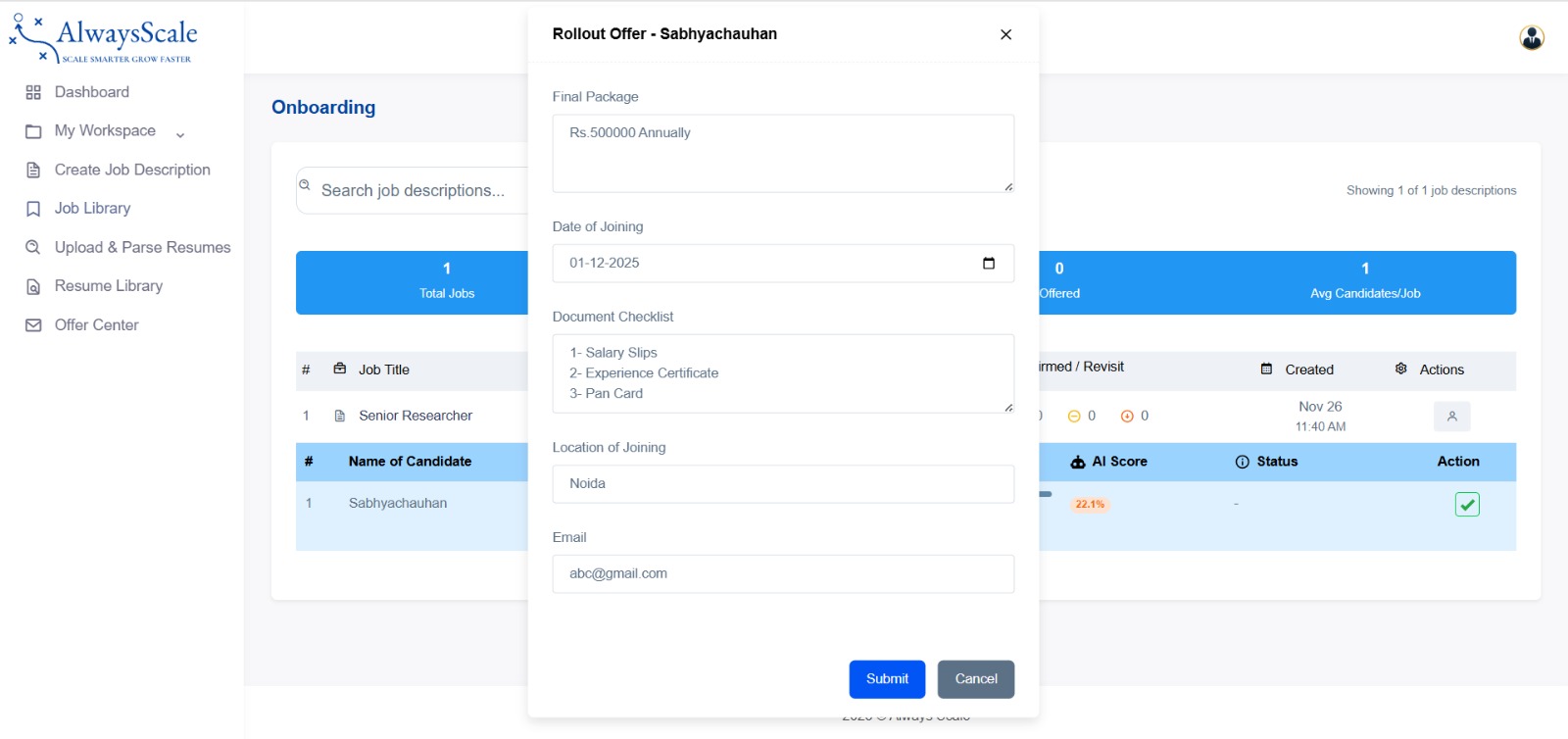
Fill Offer Details (2 min)
Enter package, joining date, location, and document checklist items (PAN, Aadhaar, experience letters, payslips, etc.).
Send Offer (Instant)
System sends a clean, mobile-friendly email with full offer details and two main actions: [Accept Offer] and [Discuss with HR].
Candidate Accepts or Requests Discussion
Accept: Clicks "Accept Offer", confirms details, can upload signed letter and documents.
Discuss: Clicks "Discuss with HR" and submits concerns.
Real-Time Updates
Dashboard shows live status: Sent → Revised → Accepted → Documents Uploaded.
Offer Management Built For Speed And Clarity


Acceptance + Documents, All in One Flow
When candidates click “Accept Offer”, they land on a secure confirmation page showing:
- Role, package, joining date, location
- Document checklist
- File upload fields for:
- Signed offer letter (PDF/Image)
- ID proofs (PAN, Aadhaar)
- Experience/Relieving letters
- Educational certificates
- Payslips
After clicking “Confirm Acceptance”, uploads are saved to their profile and visible on your dashboard as “Documents Uploaded ✔”.
No chasing on WhatsApp. No “please send your documents again” headaches.
Offer Letter vs Manual Process
| Feature | Manual | Alwayscale |
|---|---|---|
| Time to create 1 offer | 30–60 minutes | 2–5 minutes |
| Tracking acceptance | Email search | Live dashboard |
| Handling negotiation | Multi-email threads, new PDFs | Discussion + Revise Offer buttons |
| Documents collection | Separate emails / on-joining chaos | Upload during acceptance |
Frequently Asked Questions
1.How do candidates accept offers?
They click a unique "Accept Offer" link in the email, confirm details on a secure page, optionally upload documents, and click "Confirm Acceptance".
2.Can candidates upload signed offers and documents?
Yes. The acceptance form includes upload fields for signed offer letters and required documents (ID, experience letters, payslips, etc.).
3. What if a candidate wants to negotiate?
They click "Discuss with HR", share their concerns, and you can revise the offer and resend in a few clicks.
Ready to Transform Your Hiring?
Join forward-thinking SMBs who are already hiring smarter with Alwayscale.
Get Early AccessEarly Adopters 
Our Headquarters
B-128, First Floor, Sector 2,Gautam Budh Nagar, Uttar Pradesh - 201301 Phone: +91 63709 37114
Email: contact@alwayscale.com